RDS-PS Explained: How One Tag Connects Your Entire Plant
If you've ever struggled to track down the right document for a piece of equipment, or had maintenance, engineering, and the control room all using different names for the same pump, you're not alone. RDS-PS is the international standard that solves exactly this problem. Previously, I shared thoughts on why RDS or information management matters, see that article under the "related articles" in the right. This article focusses more on what it is, how it works, and why it matters for your plant from a more technical perspective.
What Is RDS-PS, and Why Should You Care?
RDS-PS stands for Reference Designation System for Power Supply. It is an internationally recognised method, defined under the ISO/IEC 81346 standard series. It is for giving every piece of equipment in a plant a unique, structured identifier. Think of it as a post code for your assets: short, systematic, and to some extent immediately meaningful to anyone who knows how to read it.
Whether you are running a power station, a water treatment facility, or an offshore platform, RDS-PS gives your entire operation a shared language. Engineers, operators, maintenance teams, and suppliers can all refer to the same item in the same way, across every document, every database, and every work order.
The core idea - One designation. Used consistently. Across every document, system, and team in your plant. That is RDS-PS in a sentence.
Two Perspectives on the Same Asset
RDS-PS is generic and flexible in how to designate your asset. It is not providing you with a strict guide or rule of how to apply it. It is more up to the user to justify how to apply it. This was also the point in the article focusing on RDS-PP vs RDS-PS. Thus, must the user define how to apply for example the different aspects. Even with ISO 81346-101 it is recommended but not decided or strictly stated how to apply them. This recognises a fundamental truth that engineers deal with every day: a piece of equipment can be looked at from two very different angles, and both are valid.
Take a hydraulic pump. To the operator or the service engineer, what matters is what that pump does, it pressurises the hydraulic system, keeps the actuators moving, and is essential to the process. To the designer, the manufacturer, or the procurement team, what matters is what that pump is, a specific product, with a model number, a datasheet, and a physical location on the skid.
At SøDera, we believe the best practise with RDS-PS is to let the functional aspect be owned by the operator / Service department and the product aspect be owned by the Designer / Manufacturer. Illustrated below in a table:
| Functional Aspect | Product Aspect |
|---|---|
| Answers: What does this item do? | Answers: What is this item? |
| Owner: Operator / Service Department | Owner: Designer / Manufacturer |
| Defines the role in the process | Defines the physical product identity |
| Used in: P&IDs, operating procedures, alarm lists, maintenance job cards | Used in: datasheets, procurement, spare parts, installation drawings |
| Prefix: = | Prefix: - |
This split is deliberate and important. Together, they cover every question you will ever have about an asset, especially if we include the type aspect, %.
Why this separation matters in practice - When a pump is replaced with a different model, the product designation may change, the physical product is different. But the functional designation stays exactly the same, it is still performing the same role in the process. Your operating procedures, alarm setpoints, and maintenance routines do not need to change, unless of course it has different maintenance schedules. Only the procurement and installation records are updated.
A Worked Example: The Hydraulic Pump
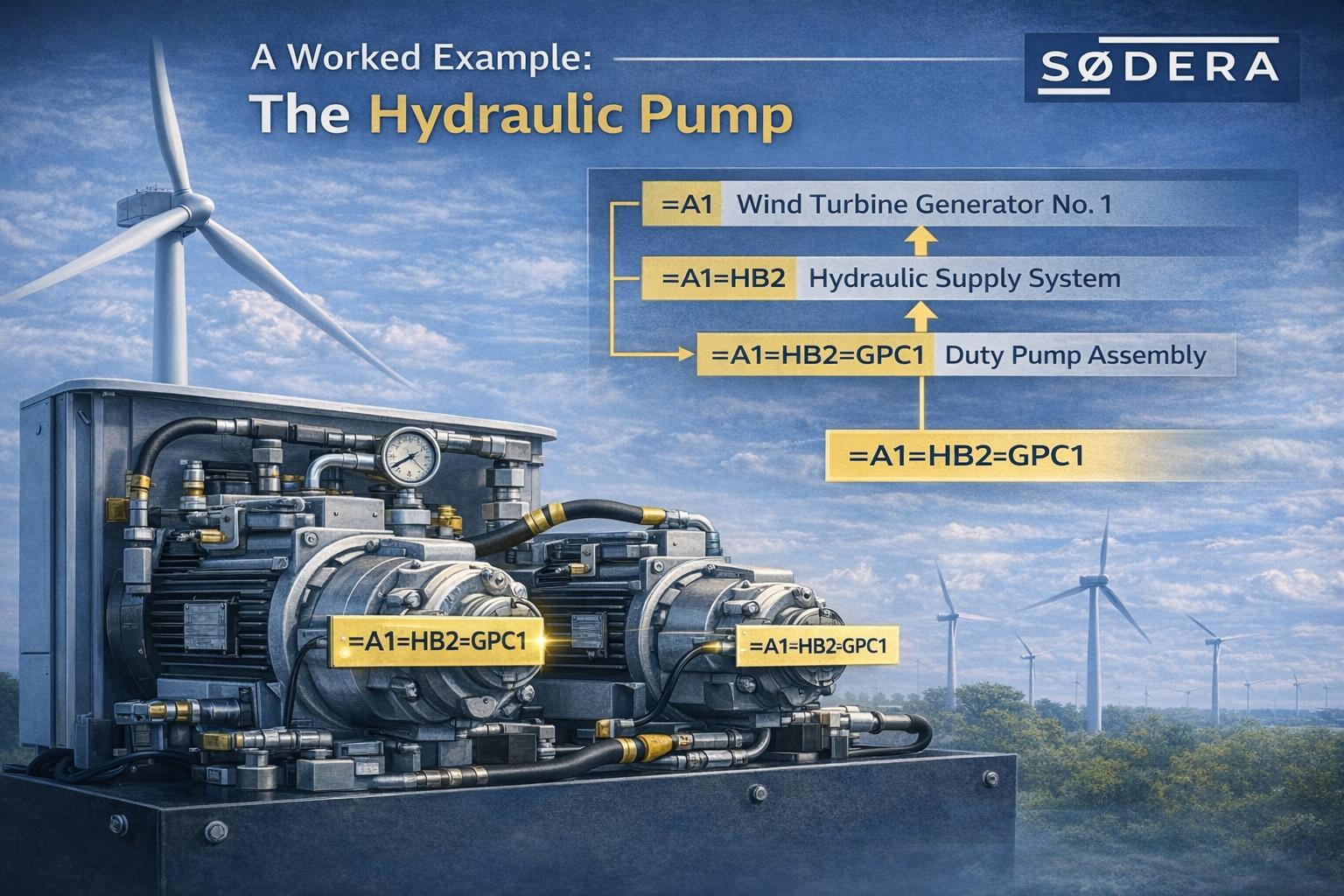
Let us make this concrete. A modern wind turbine relies on a hydraulic supply system to operate the blade pitch mechanism, the rotor brake, and other safety-critical functions. That system includes two pump assemblies, a duty pump and a standby pump.
Here is how RDS-PS designates those pump assemblies, from both the operator's perspective and the designer's perspective.
The Hierarchy as a Tree
RDS-PS is a hierarchical system. Every code is built by stepping down through the plant structure, level by level. The tree below shows how the designation for each pump assembly is constructed, from the top-level turbine down to each individual unit:
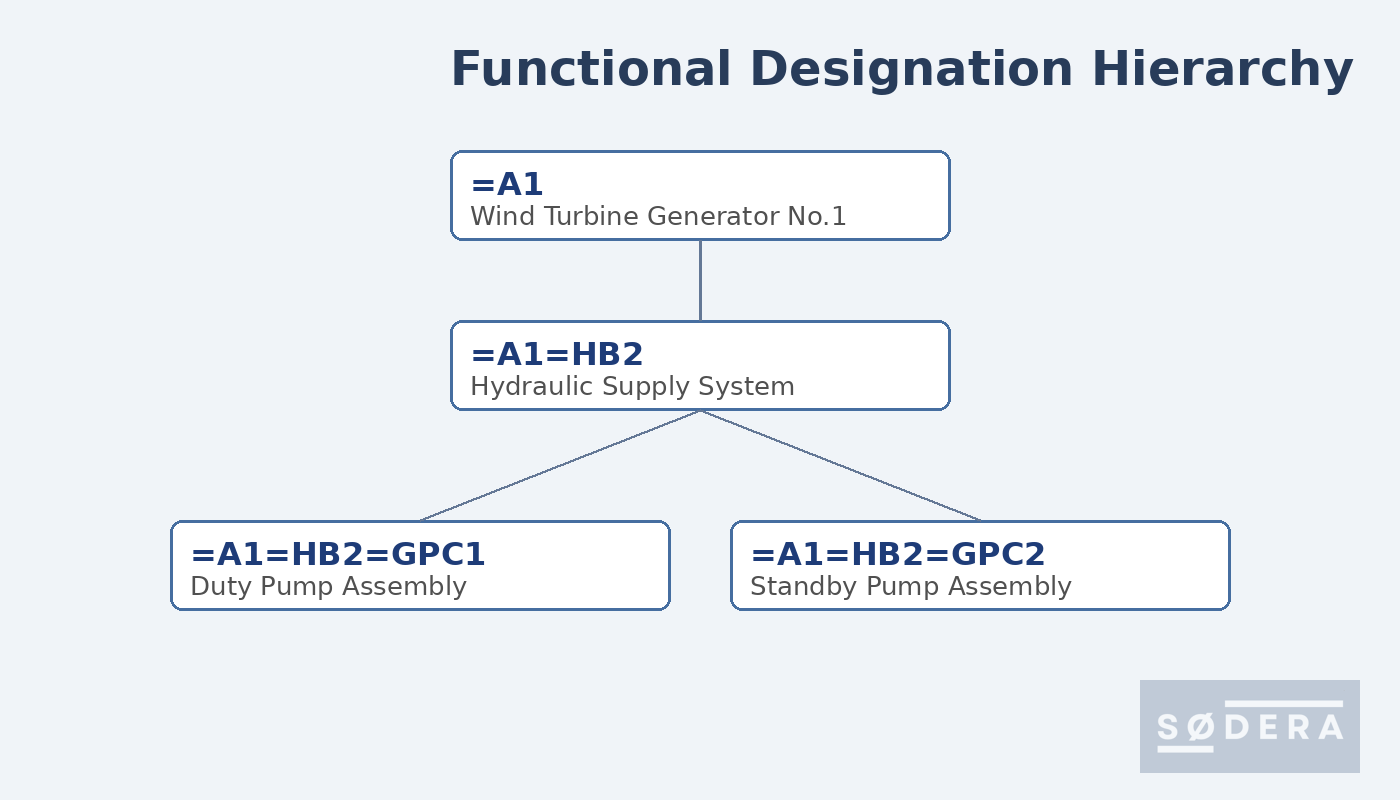
Notice that =GPC1 and =GPC2 sit at the same level, both are direct children of the hydraulic supply system =HB2. Duty and standby roles are expressed by giving each pump assembly its own distinct code. I'm forced to state this is how it could be done as RDS-PS would also "allow" if you wanted one pump assembly with the two pumps underneath, or a third option.
The Functional Designation - the operator's view
The functional designation is read directly from the tree. Each pump assembly already has a unique, complete designation. The code itself carries the full context, turbine, system, and role:
| Pump assembly | Functional designation | Meaning |
|---|---|---|
| Duty pump assembly | =A1=HB2=GPC1 | Duty pump unit in the hydraulic system of WTG A1 |
| Standby pump assembly | =A1=HB2=GPC2 | Standby pump unit in the same hydraulic system |
The Product Designation - the designer's view
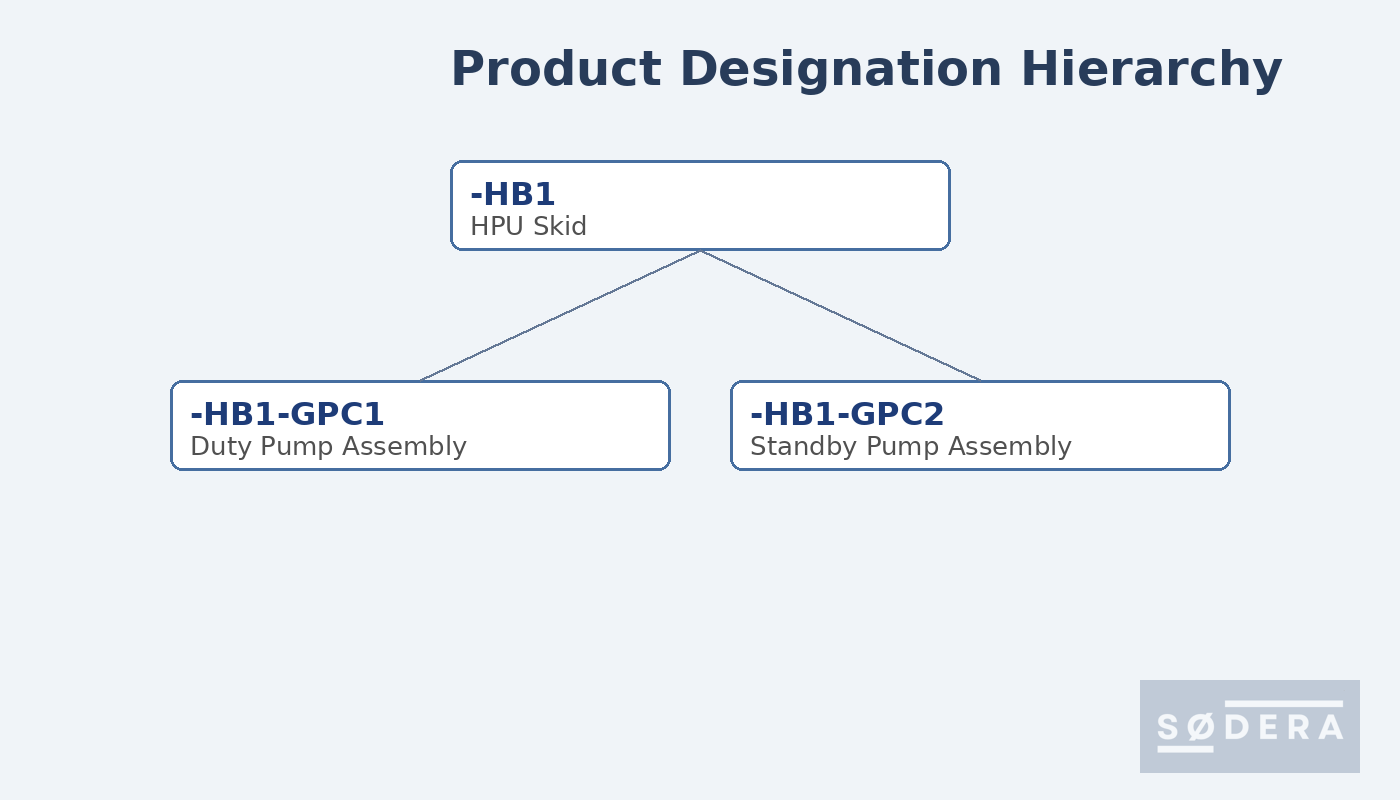
The product designation, in this case, mirrors the same tree structure, using the hyphen (-) prefix instead. It is assigned by the designer or manufacturer to identify each pump as a physical product, independently of what operational role it plays:
| Pump assembly | Product designation | Meaning |
|---|---|---|
| Duty pump assembly | -HB1-GPC1 | Duty pump unit on HPU skid HB1 |
| Standby pump assembly | -HB1-GPC2 | Standby pump unit on the same HPU skid |
The product aspect could look completely different than what is reflected above. It is not an aspect which is suggest getting deeper standardized but instead left open for the designers.
Combining Both, the complete asset tag
In day-to-day use, both designations appear together as a compound tag. This is what could go on the physical nameplate, into the CMMS, and onto every document that refers to that pump:
| Complete tag | Designation | Meaning |
|---|---|---|
| Complete tag -- duty pump | =A1=HB2=GPC1 / -HB1-GPC1 | Functional role in WTG A1 hydraulic system + physical identity on HPU skid |
| Complete tag -- standby pump | =A1=HB2=GPC2 / -HB1-GPC2 | Standby role in WTG A1 hydraulic system + physical identity on HPU skid |
It is important to state it may be combined as it may also be managed via mapping links in databases or similar. The exact approach if the physical label shall include both aspects or not shall be determined internally in the company and must be well documented in the "RDS implementation specification".
The Bigger Picture: RDS-PS as Your Central Connection Point
Here is where RDS-PS really starts to earn its place. The tag is not just a label. It becomes the single reference point that ties together every piece of information about an asset, from design to operation to decommissioning.
Think about all the different types of information that exist for that hydraulic pump:
- The engineering datasheet and equipment specification
- The P&ID showing how it connects to the rest of the system
- The installation drawing showing its physical location on the skid
- The electrical schematic for its motor starter and control circuit
- The maintenance schedule and inspection records
- The alarm and trip setpoints in the control system
- The signal list, every sensor, transmitter, and feedback from the pump
- The spare parts list and procurement history
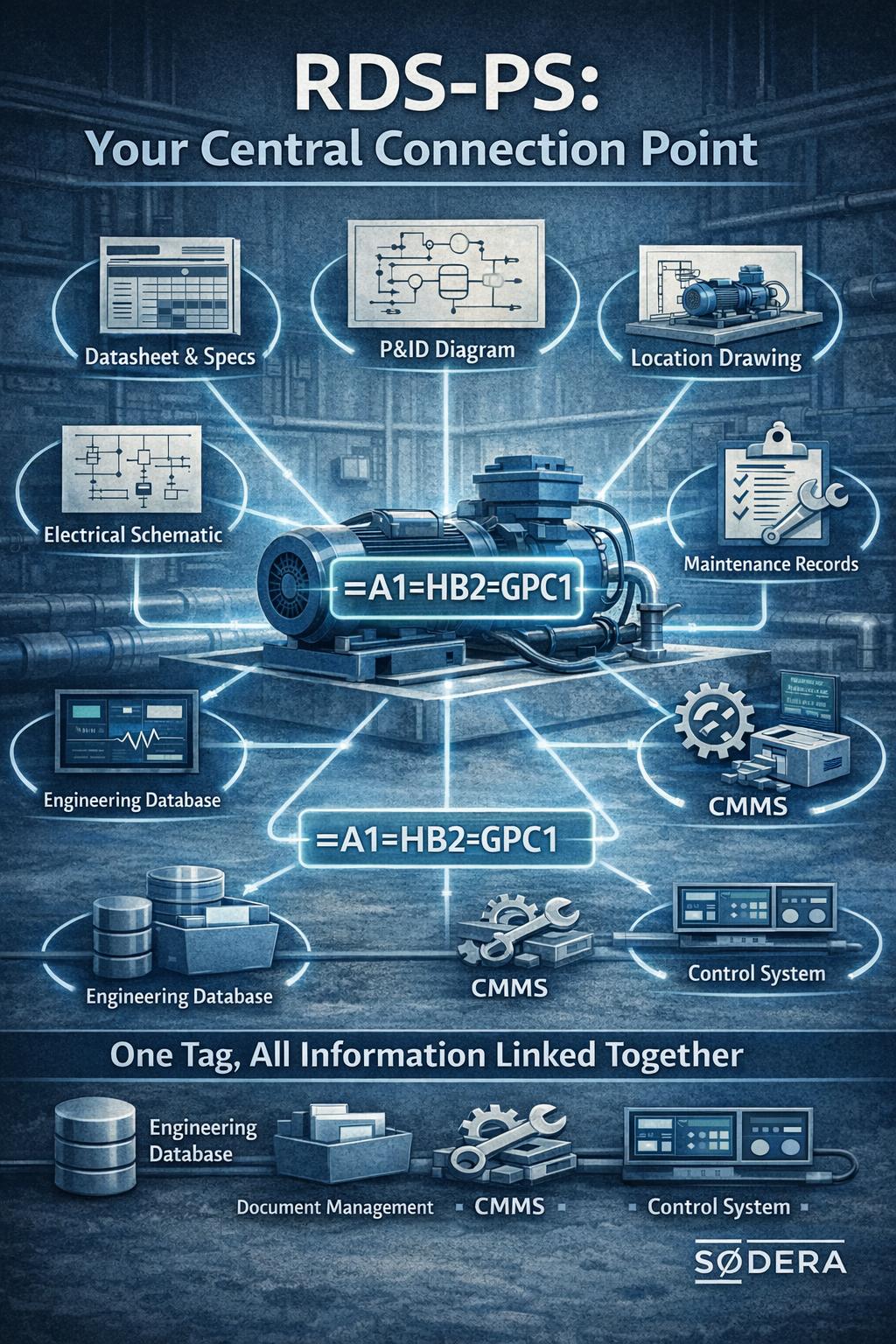
Without a consistent designation system, all of this information lives in different places, using different names for the same item. With RDS-PS, every single one of these documents and records carries the same tag, and that tag becomes the search key that connects them all.
RDS-PS as your information backbone - The RDS-PS code is not just a name, it is the linking key across your engineering database, document management system, CMMS, and control system. Search for =A1.HB2.GPC1 in any of those systems and you find everything related to that pump, instantly.
Systems Engineering Requirements and RDS-PS
If you are building your plant using a systems engineering approach, defining requirements at each level of the hierarchy and tracing them down to individual components, RDS-PS fits naturally into that process.
Each requirement in your systems engineering model can be linked to the RDS-PS designation of the asset it applies to. A performance requirement ("the hydraulic supply system shall maintain 250 bar at all times") traces down to the functional designation of the pump responsible for meeting it. A physical installation requirement ("the pump unit shall be installed in Module A, Zone 2") links to both the product designation and the location designation.
This matters because the correct level of the RDS-PS hierarchy to attach a requirement to depends entirely on the nature of that requirement:
| Type of requirement | Attach to | Example |
|---|---|---|
| Process performance requirement | = Functional aspect | Flow rate, pressure, availability |
| Physical product requirement | - Product aspect | Dimensions, material spec, ATEX rating |
| Physical location requirement | + Location aspect | Module, zone, floor level, access route |
| Signal / interface requirement | = or - (depending on context) | Control signal, feedback, alarm threshold |
Getting this right from the start, during FEED or early design, means your requirements traceability matrix, your verification records, and your as-built documentation all use the same designations consistently. Retrofitting this structure later is significantly harder and more expensive.
Signals, Instruments, and the RDS-PS Tag
This is where RDS-PS moves from being a useful labelling system to being something genuinely powerful, and it is an area the industry has been slow to take full advantage of.
Every piece of equipment in a hydraulic system has signals attached to it. The duty pump assembly alone will have a pressure transmitter on its outlet, a temperature sensor on the motor or bearing housing, a run/stop status signal from the drive, a filter differential pressure switch, and probably one or more alarm and trip setpoints. Each of these signals lives somewhere, in the control system, in the SCADA database, in the alarm list, in the cause-and-effect matrix.
The question is: how do those signals connect back to the asset they belong to? In most plants, the answer is: not very well. Signal tags follow instrument conventions, equipment tags follow one system, and the SCADA uses something else entirely. Tracing a live alarm back to the right datasheet or maintenance record can take hours.
For the duty pump assembly on turbine A1, the instruments and their RDS-PS designations look like this:
| Instrument | RDS-PS tag | What it measures |
|---|---|---|
| Pressure transmitter | =A1=HB2=GPC1=BPA1 | Outlet pressure, duty pump |
| Temperature transmitter | =A1=HB2=GPC1=BTA1 | Motor / bearing temperature |
| Differential pressure switch | =A1=HB2=GPC1=BPD1 | Filter differential pressure |
| Pressure switch (high alarm) | =A1=HB2=GPC1=BPB1 | High-pressure alarm, pump outlet |
Connecting RDS-PS to IEC 61400-25
IEC 61400-25 is the international standard for data communication between wind turbines and SCADA systems. It defines a structured data model where each turbine exposes signals through named Logical Nodes, standardised function groups that describe what part of the turbine a signal belongs to. For hydraulic systems, the relevant logical node is WHYD (Wind turbine HYDraulic system), with data objects such as HydPres for hydraulic pressure, HydTmp for temperature, FilDif for filter differential pressure, and PmpSt for pump status.
On its own, IEC 61400-25 tells your SCADA what a signal means, but not which physical asset it comes from. When a turbine has two pump assemblies, both will expose a WHYD logical node. Without an additional reference, there is no way to know from the data model alone which node belongs to the duty pump and which to the standby.
Linking each IEC 61400-25 data object to its RDS-PS functional designation solves this directly:
| RDS-PS tag | IEC 61400-25 reference | Signal |
|---|---|---|
| =A1=HB2=GPC1=BPA1 | A1/WHYD1.HydPres | Outlet pressure -- duty pump |
| =A1=HB2=GPC1=BTA1 | A1/WHYD1.HydTmp | Temperature -- duty pump |
| =A1=HB2=GPC1=BPD1 | A1/WHYD1.FilDif | Filter differential pressure -- duty pump |
| =A1=HB2=GPC2=BPA1 | A1/WHYD2.HydPres | Outlet pressure -- standby pump |
The standby pump maps to WHYD2, a second instance of the same logical node. With the RDS-PS link in place, an operator seeing an alarm from A1/WHYD2.HydPres can trace it directly to =A1=HB2=GPC2, find the right P&ID, the right maintenance record, and the right spare parts list, all from the same tag. For substation engineers, IEC 61850 works on the same principle, linking protection relay and switchgear signals to their RDS-PS designations in exactly the same way.
RDS-PS + IEC 61400-25, why this matters - IEC 61400-25 tells you what the signal means. RDS-PS tells you exactly where it comes from. Most wind farms have one or the other. Very few have both working together. Those that do spend less time chasing alarms and more time understanding what their assets are actually telling them.
What This Means for Your Operation
When RDS-PS is implemented consistently across your plant, several things happen that directly improve how your operation runs:
- Operators understand alarms faster. Because the tag tells them where and what, not just a number.
- Maintenance is more efficient. Technicians can find every document for a piece of equipment using a single search term.
- Engineering changes are safer. Because the functional designation stays stable, changes to physical equipment do not cascade unpredictably through documentation.
- Data quality improves. One tag across all systems means fewer duplicate records, fewer mismatches, and fewer errors caused by different teams using different names for the same asset.
- Handover is cleaner. When you hand a project over from EPC to operator, or when you bring in a new contractor for maintenance, RDS-PS gives them an immediately usable reference system.
- Maintenance strategy. By having a clean record along with requirements of the asset, you are equipped with all the information you need to optimize your maintenance strategy.
Getting Started with RDS-PS
The best time to implement RDS-PS is at the start of a project, during concept design or FEED, when the plant hierarchy is being defined and document structures are being set up. But it is never too late to adopt the standard on an existing plant. A structured roll-out, starting with the systems and assets that cause the most operational pain, can deliver real benefits within months.
Need help deciding?
We help engineering teams set up structured designation systems, from initial code allocation registers through to full implementation across P&IDs, CMMS, and control systems.
Contact SøDera for expert guidance on implementing the right RDS-PS for your organization.
Stay informed
Get new insights in your inbox
When we publish a new article on RDS, document management, or asset data strategy, we will send it to you directly. No noise, no marketing. Just the article.
Unsubscribe any time. We do not share your email.